
The handover pack has gone across. People are moving to the next job. A work phone, a client login and a recurring charge may each need a different instruction.
Those instructions do not all belong to IT. The project owner decides what the work still requires. The commercial or contract owner confirms the relevant obligations. IT and service providers act on the systems and services they control. Someone then checks what was actually completed.
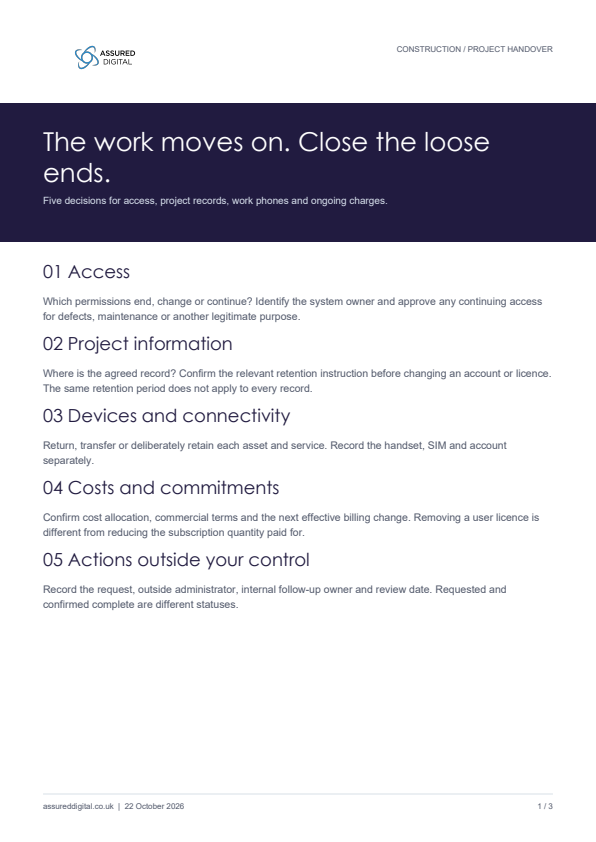
This checklist is for that conversation. Use it when a project, work package or person changes responsibility. It is an operational aid, not a contract assessment or an instruction to remove access automatically at practical completion.
1. Agree what access still has a purpose
Start with the actual people and systems, rather than a blanket instruction to “remove everyone”. A subcontractor finishing a package, a colleague moving projects and a team supporting defects may need different access afterwards.
List the project workspace, client portal, shared folders and specialist applications involved. For each, record who supplies the account, who administers permissions and what ongoing access has been approved. An account remaining active is not, by itself, a failure if there is a legitimate, controlled reason.
Ask: Which access ends, which continues, who approves the decision and when will continuing access be reviewed?
Changing a password or requesting access removal is not evidence that every session or separate application has closed. Microsoft explains that applications and session mechanisms affect when revocation takes effect. Ask the technical owner what their completed action establishes.
2. Separate retaining information from leaving access open
A folder may contain records the business needs to keep even though a particular person no longer needs access. Equally, handing documents to the client does not establish whether your business has the copies and responsibilities it needs for its own records.
Agree the authoritative record location, the person responsible for it, the continuing access required and the applicable retention instructions. Include relevant drawings, photographs, approvals and correspondence where they form part of your actual handover. There is no single retention period for every project record. Use the contract, the type of information and your organisation’s requirements to agree the instruction.
Ask: What must remain available, where is the agreed record, and who confirms the retention instruction before an account or licence changes?
3. Give work phones and connectivity a destination
For equipment and services allocated to the work, record whether each will be returned, transferred, retained or reviewed. A device, its SIM and the account used on it are separate items. Moving the handset does not necessarily move a cost allocation or close the previous user’s access.
Include a temporary data service or other connection only where one was actually provided. Check whether another team still depends on it before requesting a change. For personal devices, confirm the supported removal of organisational app data where appropriate; do not promise that every separately retained copy can be erased.
Ask: Who has the asset, who needs the service next and which account or access changes accompany the move?
4. Close the cost instruction as well as the technical action
Reconcile the relevant handset, SIM, application licence, support arrangement and any temporary service against its next use. The right action might be reassignment, a change of cost code, a reduction when terms allow, or keeping the service deliberately.
Distinguish removing a licence from a user from reducing the subscription quantity you pay for. Microsoft documents these as separate administrative actions. Preserve the required information first and check the commercial terms and effective date with the appropriate owner or provider. A completed access change does not guarantee an immediate saving.
Ask: Which charge continues, why, under whose approval, and when can the next permitted change take effect?
5. Keep outside actions visibly open
A client-controlled portal, another contractor’s application or an external service can leave an action outside your team’s direct control. Record the request reference, the organisation responsible, your internal follow-up owner and the next review date.
“Requested” and “confirmed complete” are different statuses. If your IT team has removed the permissions it administers but a client portal is still awaiting confirmation, say exactly that. Do not turn a partly completed process into an unqualified assurance statement.
Ask: What remains outstanding, who is chasing it and what confirmation will close the record?
A closeout register that is small enough to use
| Area | Decision to record | Who needs to confirm it |
|---|---|---|
| People and access | End, change or retain each required permission; name the system owner. | Project owner and relevant technical administrator. |
| Project information | Agreed record location, ongoing access and retention instruction. | Information owner and relevant commercial or compliance owner. |
| Devices and connectivity | Return, transfer or approved continued use; record device and service separately. | Asset/service owner and receiving team where applicable. |
| Costs and commitments | Cost allocation, billing action, commercial constraints and effective date. | Budget/contract owner and provider where required. |
| Outstanding external action | Request reference, status, follow-up owner and next review. | Client/provider administrator plus your internal owner. |
Download the blank project closeout register. It contains these five areas with fields for the decision, owner, approver, request reference, effective date, completion evidence and outstanding action.
What a useful closing note looks like
Illustrative wording: “The agreed project records remain in the named archive. Our IT team has confirmed the specified folder-permission changes. The client-portal request is still open with the project owner for follow-up. The work phone has transferred to the receiving team; the service and cost allocation are recorded separately.”
That note is useful because it identifies the boundary of the confirmation. Adapt it to the actual facts; it is not evidence that those actions have happened in your organisation.
Use it on one real handover
Choose a current project or work-package change. Ask the project owner, IT and the person who owns the relevant costs to fill the five areas together. Leave an item open when confirmation is missing. Record an approved continuing arrangement rather than treating every ongoing account or charge as an error.
The diagnostic is a self-review of communications and mobile-access arrangements. It does not inspect your systems, certify compliance or determine your contractual duties.
Technical references
Microsoft: revoking user access and session limitations · Microsoft: removing a user licence and reducing paid licence quantity · Microsoft: selective removal of organisational app data. Technical references reviewed 22 October 2026. The illustrative wording and checklist are editorial working aids, not customer case studies.