
Another project. Another round of access requests.
Company phones, personal devices, subcontractor accounts and client portals. Compare the arrangements, agree who supports them and give the project team a clear decision.
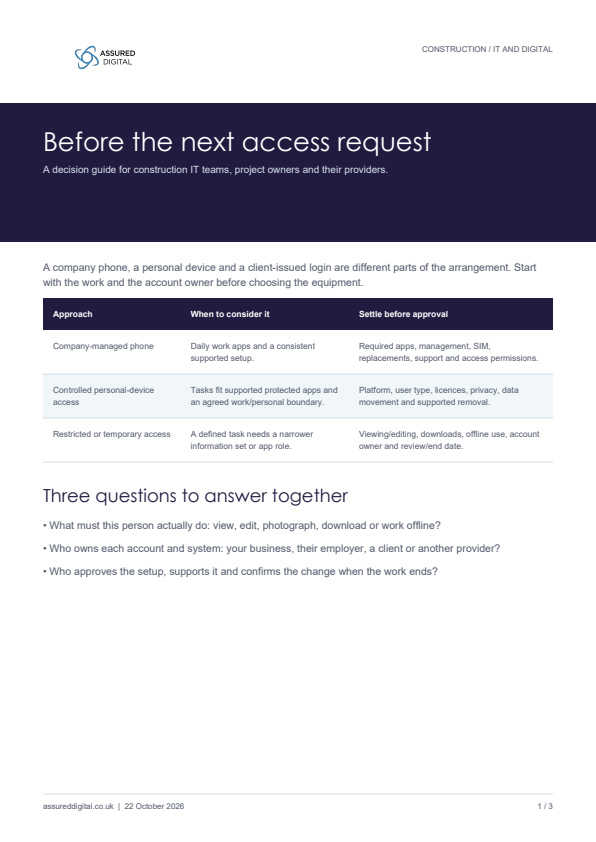 YOUR WORKING GUIDE Guidance + fillable worksheet ↗
Three options.
Different responsibilities.
Compare the work, support and information requirements. A cheaper handset arrangement can still leave the business with setup and support to provide.
A company-managed phone
A consistent work device, with a support arrangement the business can own.
Consider it when the role relies on daily work applications, a standard setup and a dependable replacement service.
- Before choosing
- Confirm the required apps, account owners, working conditions and replacement arrangements.
- Whole cost
- Handset, SIM, licences, management, repair, replacements and support.
- Information
- Agree sharing and download rules. Owning the phone does not give you control over every client application.
- When work changes
- Update access, recover the asset and follow the business’s handover and retention instructions.
A managed device still needs a properly configured access model.
These are access models to evaluate, not a recommendation that every person with a particular title needs the same device.
See how the decision changes with the work
One project.
Different people.
Use these illustrative scenarios to start a discussion with the project owner. Check the actual tasks and account arrangements before deciding.
Permanent site manager
Teams, SharePoint, project apps, photographs and calls. A working replacement matters when the role depends on the device.
A company-managed phone may fit
Confirm the applications and support service first. A company handset still needs agreed permissions and data handling.
Review policy and provider responsibilities
A policy needs
an operating model.
“Personal devices allowed” leaves several decisions open. Set the standard arrangement, then make exceptions visible enough for someone to approve and support.
Who owns the account?
Your employee’s Microsoft account, a guest invitation and a client-issued login have different owners. Record who can change or end each arrangement.
What can the controls deliver?
Confirm the supported apps, platforms, user types and licences. Test downloads, offline work and removal of protected data before writing the policy promise.
Who funds and supports it?
Compare the ongoing service: licences, configuration, user support, repairs and replacements. Identify what your team, provider and project owner each supply.
Who accepts an exception?
A project may need an application outside the standard model. Record the business owner, the limitation being accepted and a review or end point.
A useful review output: one standard arrangement, its technical boundary, the supporting service and a named route for exceptions. Use the decision sheet below to record a specific role.
Construction mobile access guide
Three access options, a fillable decision sheet and the questions to put to your provider.
Download the guide & worksheet ↓Agree the setup
before the work starts.
Put one real role through these questions with the business owner and IT. Add notes here, or download a blank sheet to use with your team.
Before you take
the next step.
Does every project worker need a company phone?
No single arrangement fits every role. Start with the required tasks, applications, support and information controls. The guide compares three options rather than recommending one device for everyone.
Can we remove all work information from a personal device?
Do not make that assumption. Selective wipe applies to organisational data in supported protected apps, subject to the setup and the action completing. It does not establish that every separate copy has disappeared.
Can we apply an employee’s app policy to every subcontractor?
External-user arrangements need a design check. The device owner, account provider and application all matter. Microsoft’s B2B guidance identifies limits, including the unsupported app-protection grant in its comparison.